DIÁRIO DE DESENVOLVIMENTO · 0.43.0
Astarojna 0.43: seu cockpit, do seu jeito
Um painel que você monta, toca e usa como parte do cockpit. A versão 0.43 reúne o trabalho das últimas semanas: novos controles, instrumentos de motor, integração com o X-Plane e melhorias para quem voa com o tablet ao lado.
A 0.43.0 é a nova versão estável. Recursos identificados como experimentais continuam em evolução; a disponibilidade de comandos e leituras depende do simulador e da aeronave.
Toque nas imagens para abrir em resolução original.
Asta Deck: monte seu painel de comandos
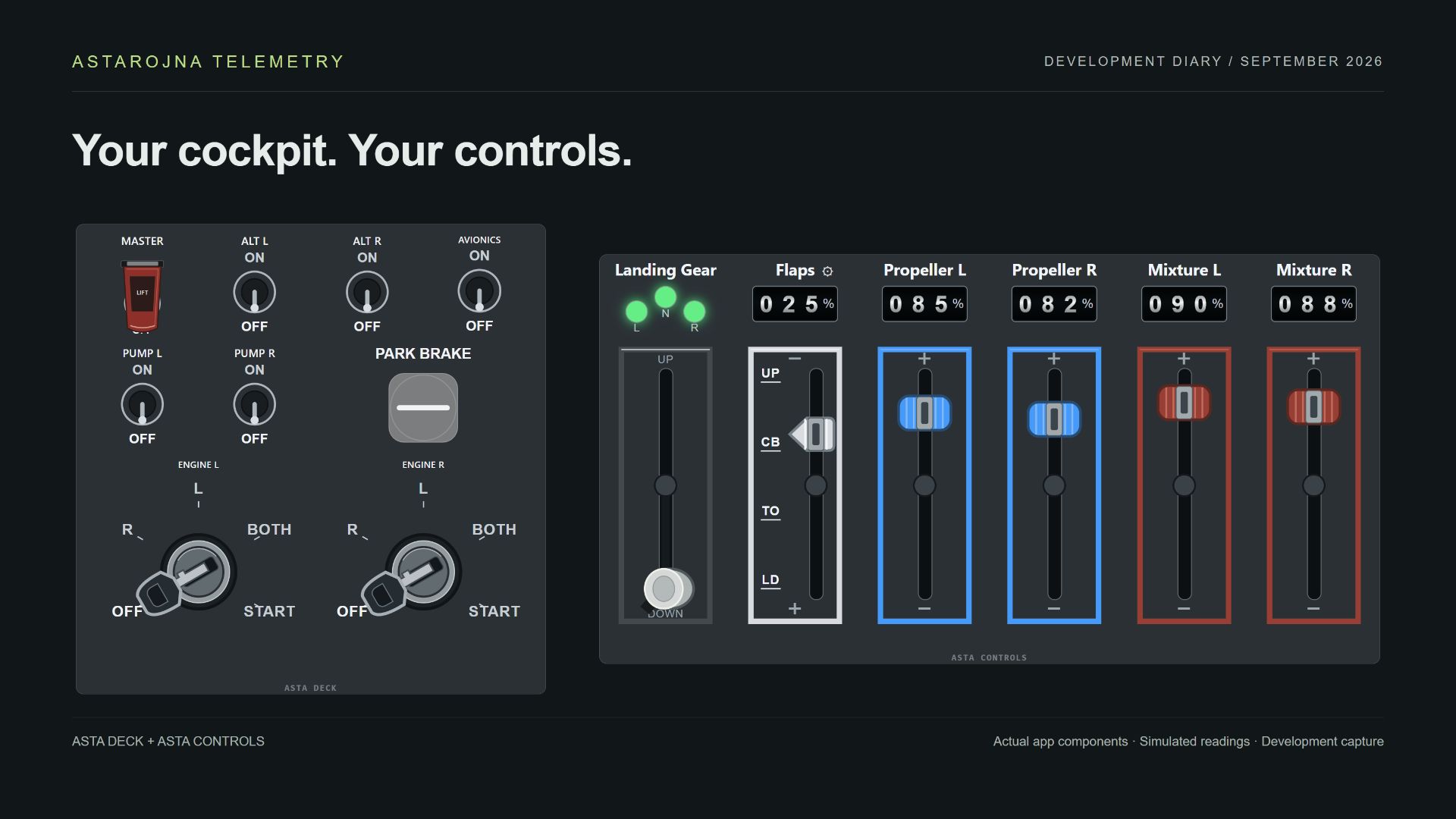
Botões, switches, interruptores com proteção, knobs, sliders e chaves de ignição passam a fazer parte da mesma bancada. Você combina os elementos na grade, escolhe seus tamanhos, reorganiza o conjunto e personaliza a aparência dos controles.
Revisamos fontes, proporções e áreas de toque para melhorar a leitura no tablet. A configuração distingue atalhos de teclado e integração com o simulador. Quando a aeronave exporta a leitura correspondente e o feedback está associado, o painel pode acompanhar alterações feitas diretamente no cockpit.
O acionamento contínuo de botões amplia as possibilidades de operação. A integração experimental com o OBS também permite preparar um conjunto de controles para gravações e transmissões.
Asta Controls: as alavancas no lugar certo
Landing Gear, Flaps, Propeller, Mixture e Airbrake ficam reunidos em um instrumento dedicado. O editor permite escolher as alavancas e sua ordem, com largura organizada automaticamente e altura ajustável. Aeronaves com vários motores podem ter comandos separados de mistura e passo da hélice.
O trem ganhou luzes mais visíveis e uma alavanca própria. As indicações usam o estado recebido do simulador: verde para baixado e travado, vermelho em trânsito e apagado para recolhido, quando esses estados são fornecidos.
Flaps permitem posições configuráveis, percentuais e pequenas legendas. Indicadores mecânicos ou digitais ajudam a acompanhar as leituras. Também melhoramos a resposta visual das alavancas: o movimento acompanha o dedo enquanto o comando segue para o jogo.
Asta Display no X-Plane: toque no painel do avião
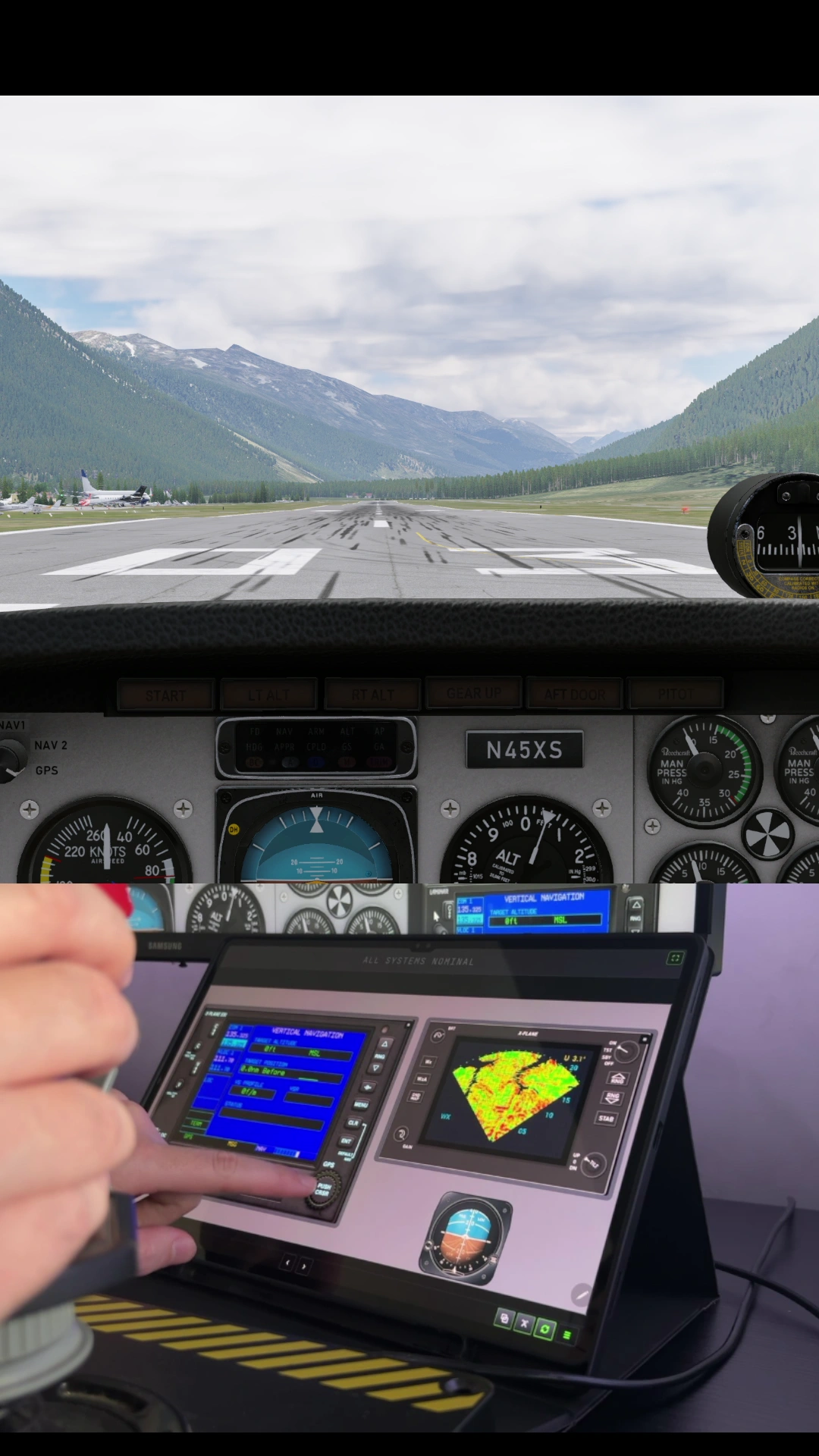
Janelas destacadas compatíveis do X-Plane podem aparecer no Asta Display. Você escolhe a janela de cada instrumento, preserva sua proporção e interage por toque com os controles da imagem capturada.
Cada Display mantém sua seleção. No tablet, as setas de navegação permitem mudar de página independentemente do painel que está aberto no computador. GPS, displays de voo e radar meteorológico passam a fazer parte da montagem conforme as janelas oferecidas pela aeronave.
DCS: displays e configuração visual
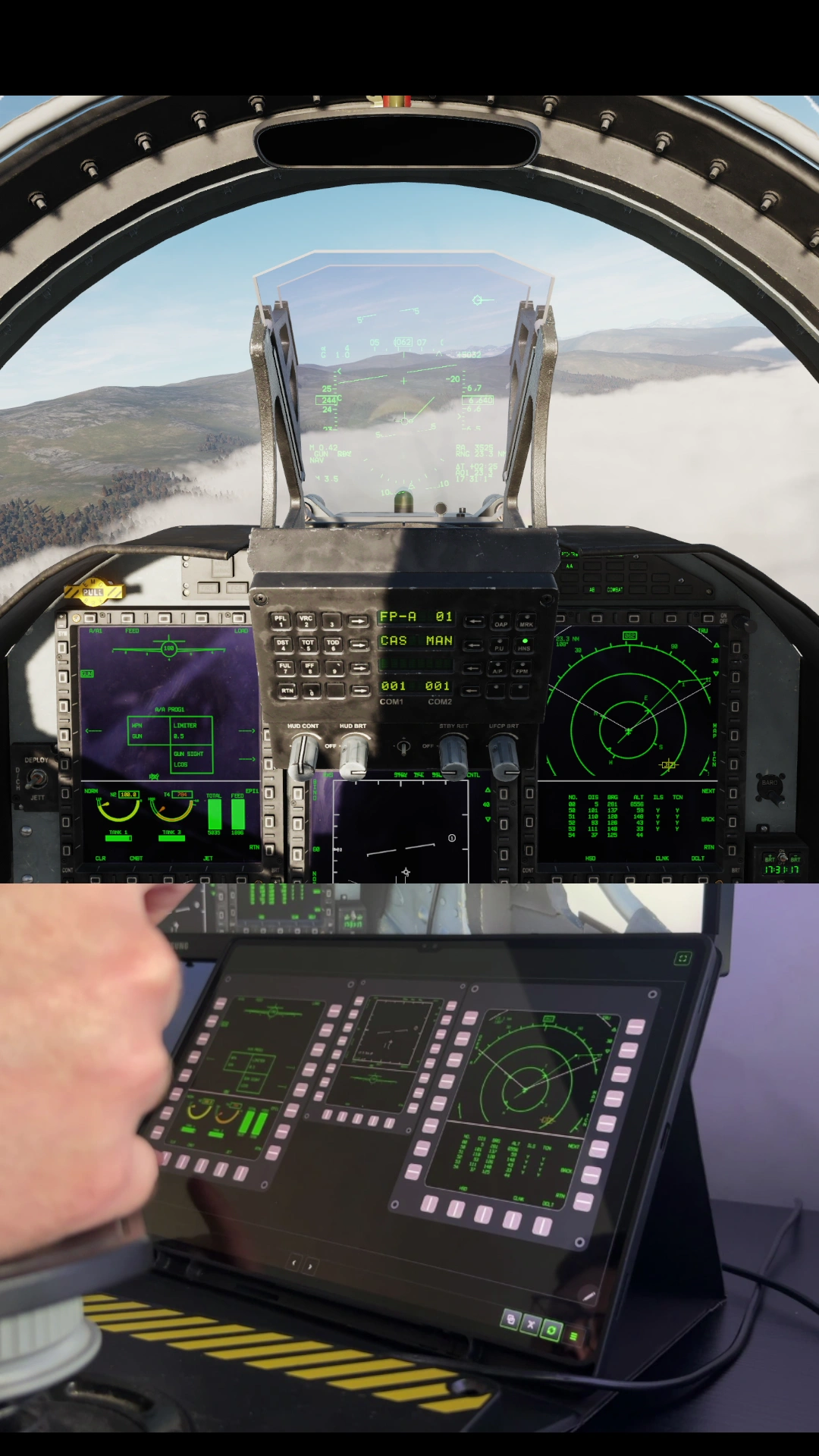
O Asta Display também integra a família Asta Deck no DCS. O trabalho inclui organização dos comandos, assistência à configuração e uma visualização mais clara da relação entre os botões e o display.
A exportação continua dependendo das telas oferecidas por cada módulo e da configuração correspondente no simulador. A gravação desta página mostra o uso real no tablet; ela não representa compatibilidade automática com todos os aviões do DCS.
Do cockpit virtual para o tablet
Aprender pelo cockpit e configurar com mais clareza
O assistente do X-Plane reúne presets, consulta de comandos e o recurso Learn from cockpit. Ele ajuda a identificar comandos acionados dentro do simulador para associá-los aos controles do painel.
Nos controles conhecidos, o assistente pode associar automaticamente o feedback correspondente. Nos demais, o jogador escolhe uma leitura disponível ou deixa o controle sem indicação de estado. Ações que utilizam lógica própria ou plugins podem exigir configuração manual.
Dois motores, instrumentos individuais
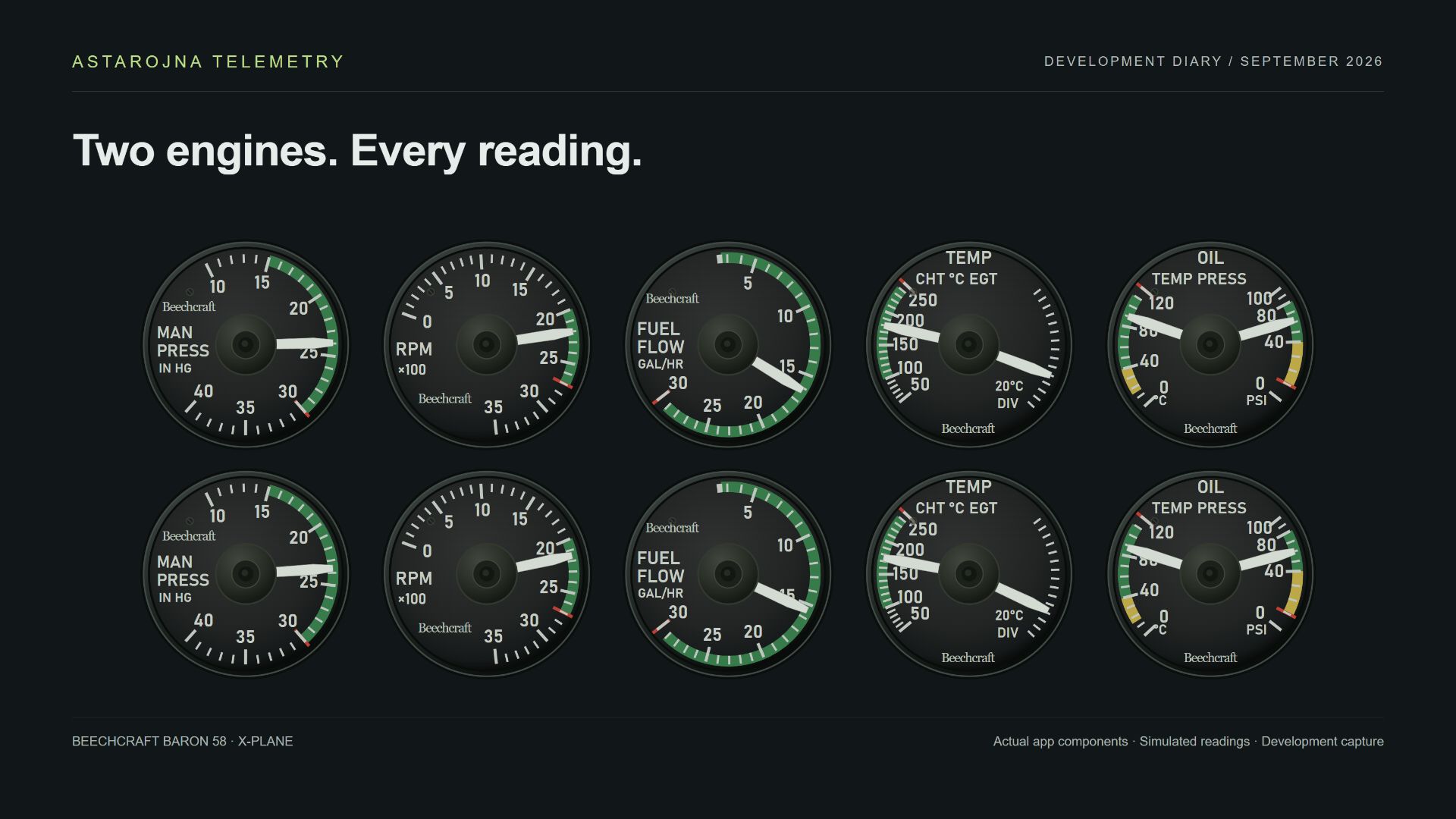
RPM, pressão de admissão, fluxo de combustível, temperaturas e óleo ganharam instrumentos individuais com seleção do motor acompanhado. Isso permite organizar duas colunas, comparar os motores e posicionar cada mostrador onde ele faz mais sentido no seu painel.
Além da apresentação clássica do Astarojna, criamos uma família visual inspirada nos instrumentos do Beechcraft Baron 58, disponível no X-Plane. Os mostradores de RPM usam uma escala mais limpa, com multiplicador ×100. As leituras dependem dos dados que a aeronave exporta.
Um horizonte com outra personalidade
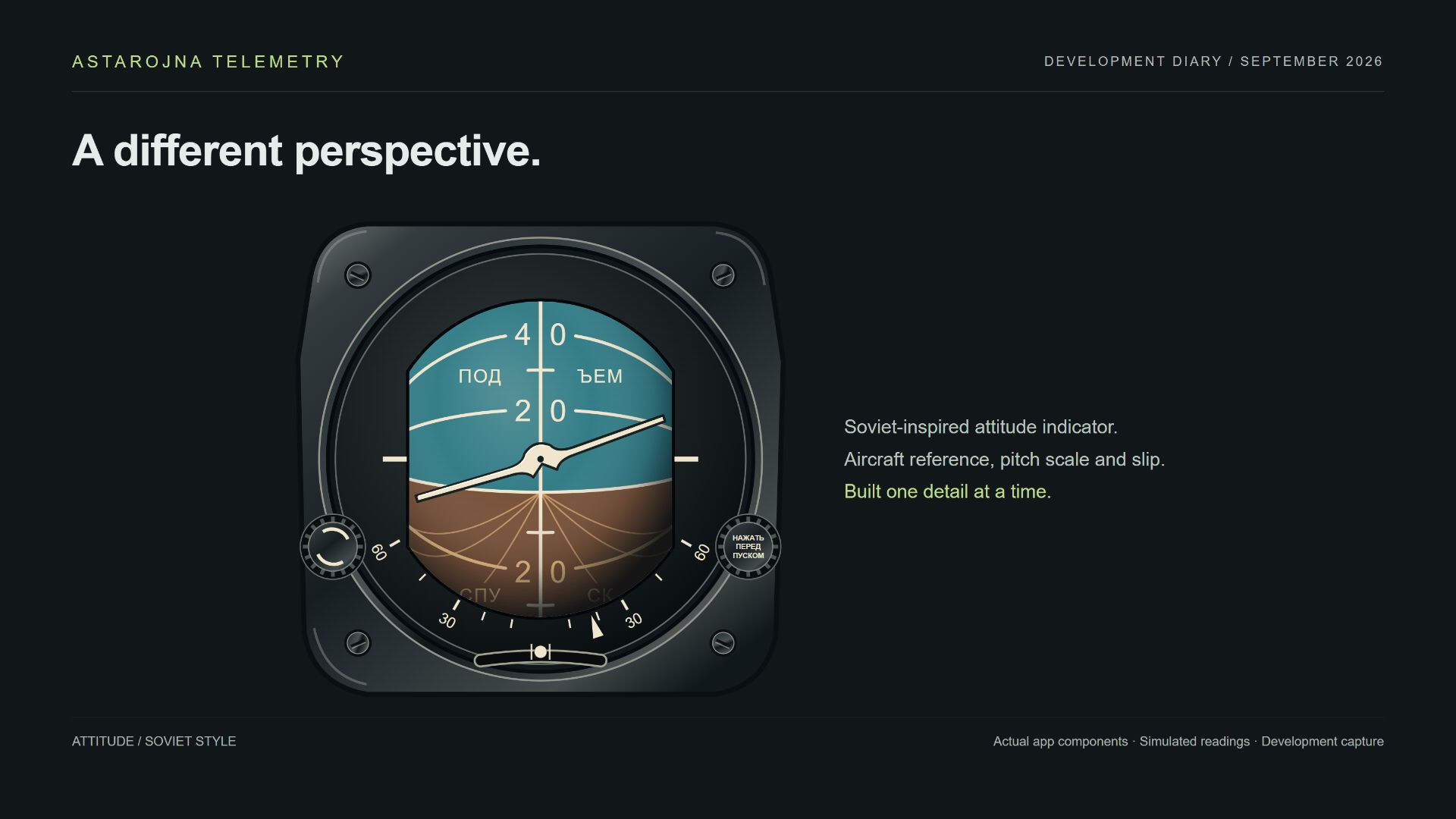
O horizonte artificial de estilo soviético foi construído detalhe por detalhe: inscrições em russo, escala de inclinação, indicador de derrapagem e a referência da aeronave girando ao redor do seu centro.
A janela recortada, a moldura e o acabamento procuram trazer a sensação física do instrumento para uma tela. Os knobs decorativos fazem parte desse desenho; não anunciam comandos funcionais no simulador.
Tablet, câmera e personalização
O tablet recebeu acesso ao overlay, navegação entre páginas e controles de headtracking. Os ajustes de câmera, eixos, sensibilidade e calibração ajudam a adaptar o acompanhamento ao posicionamento do dispositivo.
O headtracking móvel continua usando a câmera pelo navegador nesta etapa. O suporte nativo ao sensor TrueDepth permanece uma frente futura. A câmera enviada pela página do Astarojna ao OBS oferece opções de resolução que incluem 1080p e 4K, conforme a capacidade do dispositivo e do navegador.
Cores de fundo e imagens completam a personalização dos painéis. A ideia é que a montagem tenha espaço para a sua forma de voar, seus comandos e os instrumentos que você quer manter à vista.
Uma captura que pode se recuperar
A captura de displays passou a rodar em um processo separado. Se uma chamada do Windows bloquear, o app pode encerrar somente o capturador e tentar retomá-lo, preservando as telas escolhidas.
As tentativas são limitadas. Quando a recuperação não resolve, PC e tablet mostram uma mensagem de falha com a opção Tentar novamente. Esse mecanismo não reinicia o simulador nem o serviço de captura do Windows.
A mudança passou por testes automatizados de recuperação, interface e integração. A última correção de captura ainda precisa de confirmação adicional em sessões reais com GPS e radar; um problema persistente no serviço do Windows pode continuar exigindo investigação.